
We live in a time where people sign up, log in, transact, and work across digital platforms in seconds. But behind every click is a simple expectation:
“The person on the other side is who they claim to be.”
In reality, identity data doesn’t remain constant. People move houses. Jobs change. Documents expire. Circumstances shift. And in the middle of all this, businesses are trying to keep their platforms safe, fair, and compliant.
This is where re-verification steps in — not as an inconvenience, but as a quiet system that keeps everything clean, current, and trustworthy.
Re-verification is not about suspicion. It’s about alignment.
It ensures that the identity or credentials you once checked still hold true today.
In this blog, we break down what re-verification really means, why it matters, the different forms it takes, and how modern companies can implement it without disrupting user experience.
What Exactly Is Re-Verification?
Think of re-verification as the health check of identity data.
While initial verification happens during onboarding, re-verification happens later — either periodically or when something seems to have changed. Its job is simple:
✔ Refresh identity details
✔ Update expired or outdated information
✔ Validate whether someone’s current status still matches what they originally shared
It’s used by digital businesses, online marketplaces, gig platforms, lenders, mobility apps, and even government systems to keep user data accurate and prevent misuse.
If initial verification answers: “Is this person real?”
Re-verification answers: “Is this information still true?”
Why Re-Verification Has Become Essential
A decade ago, digital businesses mostly relied on a “verify once, trust forever” model. That worked in a slower world.
Now everything changes faster:
jobs, addresses, documents, devices, behaviours.
Relying on old data is not just inaccurate — it’s unsafe.
Here’s why re-verification is becoming non-negotiable:
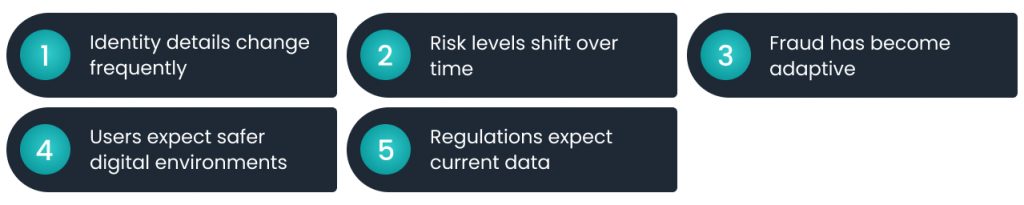
1. Identity details change frequently
People update phone numbers, change residences, get married, renew IDs, switch jobs, and so on. Without re-verification, platforms continue assuming outdated details are still valid.
2. Risk levels shift over time
Someone who was low-risk during onboarding may take actions later that indicate otherwise. Re-verification helps businesses catch early signals.
3. Fraud has become adaptive
Fraudsters don’t always strike on Day 1.
Many wait until they build trust first.
Routine reassessments block slow-brewing fraud.
4. Users expect safer digital environments
Whether you’re booking a cab, renting a flat, hiring a freelancer, or lending money — trust in the platform becomes a selling point. Re-verification strengthens that trust.
5. Regulations expect current data
Even without quoting industry acronyms, one thing is clear: businesses are expected to keep customer information updated and valid over time.
Re-verification makes that possible without chaos.
When Should Businesses Perform Re-Verification?
Re-verification doesn’t have to happen constantly.
It just has to happen smartly.
Common triggers include:
Document expiry
IDs, licenses, and address proofs all have lifespans. As they approach expiry, platforms need fresh ones.
Changes in personal details
A new address
A new job
A name update
Fresh income sources
These all require alignment of records.
Unusual account activity
New device login
Unfamiliar location
Repeated failed attempts
Large or unusual transactions
These flags often call for reconfirmation before continuing activity.
Long user inactivity
If someone returns after a year, updated identity checks ensure the right person is accessing the account.
High-risk actions
Big-ticket purchases, cross-border transactions, or actions affecting others (like onboarding vendors or tenants) often require re-verification.
Platform-wide policy upgrades
After a security update or data protection overhaul, every user may need to refresh their details once.
How the Re-Verification Process Typically Works
Re-verification doesn’t need to be complicated.
A clean, user-friendly flow looks like this:
1. A trigger is detected
For example: document expiry, unusual activity, or outdated information.
2. The user is informed
They receive a message explaining why re-verification is required and what needs to be submitted.
3. Fresh documents or credentials are uploaded
Usually through an in-app or web portal — quick, guided, and secure.
4. Automated checks run in the background
These may include comparing images, checking consistency, and scanning for tampering.
5. Manual review for exceptions
Only flagged cases go for human scrutiny.
6. Approval and account continuity
Once complete, the account continues normally.
7. Updated data is securely stored
Only accurate, current information stays in the system.
Done right, re-verification feels as light as updating your profile picture.
Different Types of Re-Verification
Identity doesn’t have one dimension — it’s a collection of data points that evolve.
Re-verification can cover:
1. Document Refresh
When IDs, licenses, or address proofs expire, updated ones are collected.
2. Identity Refresh
If personal details change — name, date of birth correction, updated government-issued IDs, etc.
3. Address Confirmation
Crucial for credit check, mobility, rental, and doorstep-delivery businesses.
4. Employment Re-Check
Useful for lenders, gig platforms, or companies in sensitive industries.
5. Business Detail Refresh
For B2B onboarding, where company status, ownership, or registration often change.
6. Biometric Re-Check
Quick facial verification or liveness detection to prevent account takeover and device-based fraud.
7. Financial Information Refresh
Updated bank details, income info, or changing spending patterns.
8. Expiry Monitoring
Automated systems track upcoming expiries and prompt for re-validation ahead of time.
Each of these builds a more accurate, safer, and up-to-date user profile.
Benefits of Re-Verification
Re-verification isn’t just a safety measure — it’s a business advantage.
1. Prevents Account Takeovers
Fresh checks make it harder for someone else to control a user’s account.
2. Blocks Slow, Hidden Fraud
Most fraud today happens gradually.
Periodic checks help businesses catch issues early.
3. Ensures Clean, Reliable Data
Accurate data powers better decisions, smarter risk assessment, and sharper analytics.
4. Improves User Safety
Users feel safer knowing that everyone around them is up to date — drivers, sellers, service providers, tenants, borrowers.
5. Reduces Operational Headaches
When data is current, customer support teams resolve issues faster and with less back-and-forth.
6. Builds Long-Term Trust
If a platform keeps user safety central, customers stay loyal — and are more likely to recommend it.
Challenges Businesses Face While Implementing Re-Verification
While essential, re-verification isn’t always smooth. Common hurdles include:
Friction in user journey
Bad timing or clunky forms frustrate users.
Managing large volumes of data
Refreshing data for millions requires smart automation.
Mixed technology stacks
Older systems don’t always integrate well with modern verification tools.
Document tracking
Monitoring millions of expiry dates is tough without automated workflows.
Balancing strictness with convenience
Too strict feels intrusive. Too relaxed isn’t safe.
Modern tools, automation, and thoughtful UX design can eliminate most of these challenges.
Best Practices for Smooth, User-Friendly Re-Verification
To make re-verification efficient — and not annoying — businesses should follow these principles:
1. Automate wherever possible
Use OCR, biometrics, image recognition, and expiry tracking to reduce manual intervention.
2. Make the experience light
In-app uploads
Camera access
One-tap confirmations
Progress updates
All of these reduce frustration.
3. Trigger re-verification based on risk
Not every user needs the same level of checking.
Dynamically assess risk and personalize the flow.
4. Communicate clearly
Explain why re-verification is happening.
People cooperate more when they understand the purpose.
5. Put security first
Encrypt everything, restrict access rights, and maintain consistent audit trails.
6. Iterate continuously
Track drop-offs, experiment with shorter forms, and adjust the workflow based on real user behavior.
Why Re-Verification Is a Business Advantage — Not a Burden
Businesses that embrace re-verification don’t just stay compliant — they become more trustworthy, more efficient, and better prepared for the future.
Here’s the real value:
- Fewer fraud losses
- Cleaner user base
- Healthier ecosystem
- Better credit and risk assessments
- Higher user trust
- Stronger brand reputation
Re-verification is no longer a “security feature.”
It’s a strategic differentiator.






Leave a Reply